Schrijf je in voor onze nieuwsbrief
Blijf op de hoogte van onze laatste ontwikkelingen en updates!
Never lose access to your Bitcoin again: Cloud Recovery
Imagine dropping your phone in the canal, or getting a new one and realising mid-setup that you have no idea where you wrote down those 24 words. If your Bitcoin is self-custodied, fully in your control, no bank in the middle, there's exactly one thing standing between you and permanent loss: your seed phrase. Which hopefully still exists. And hopefully only you know where it is.
Most people skip past this part of Bitcoin ownership. The seed phrase is what gives you access to your wallet. Lose it, and your Bitcoin is gone. Have it stolen, and someone else controls your funds. For most people users, it's the weakest link in an otherwise solid system. Cloud Recovery is how Blockrise removes that risk.
We sat down with Darryn Ah Yui, Senior Software Engineer at Blockrise, to break down exactly what Cloud Recovery is, how it works under the hood, and what it means for you in practice.
What is Cloud Recovery?
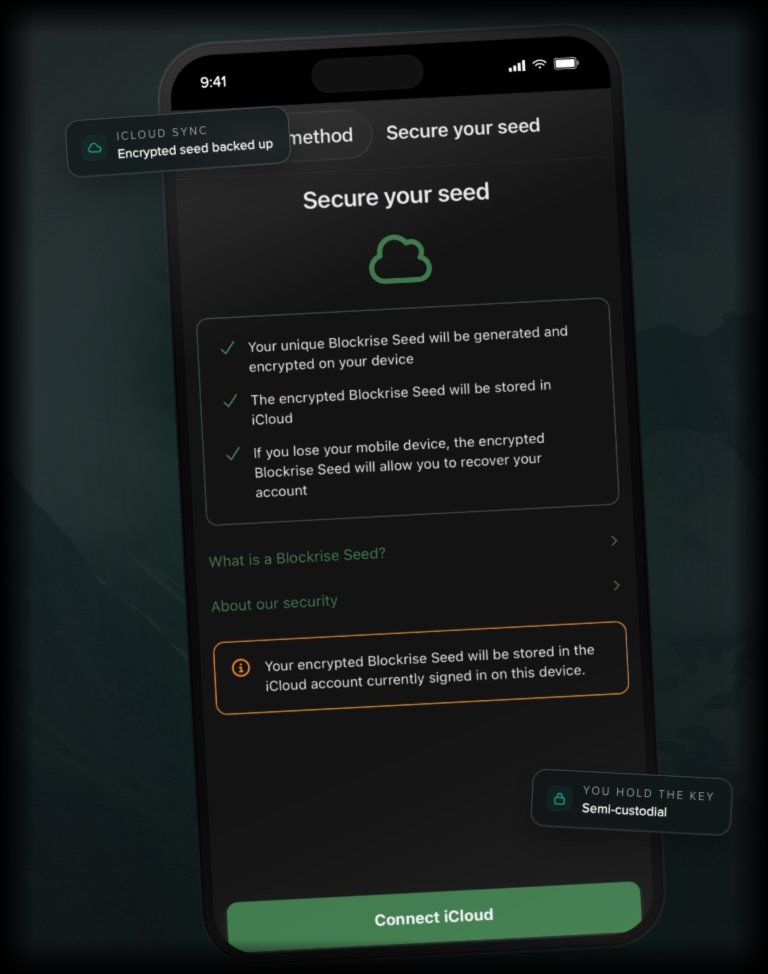
Cloud Recovery replaces the manual seed phrase process with an automatic, encrypted backup. When you set up your Blockrise wallet, you can choose to back up your seed phrase in the cloud. iCloud for iPhone users, Google Drive for Android users. It takes seconds, and you never have to write down a single word.
What gets stored in your cloud is not your actual seed phrase. It is an encrypted version: random, unreadable noise data that means nothing without a separate key. That key is stored on Blockrise's servers, also encrypted. Neither Blockrise, nor Apple, nor Google can access your seed phrase. Only you can, by combining your cloud account and your Blockrise login. The two pieces are always stored separately. Neither half works without the other.
How it works at Blockrise, step by step
During onboarding, you choose between Cloud Recovery and the traditional seed phrase route. If you choose Cloud Recovery:
- Your wallet is created and your seed phrase is generated on your device.
- A random 256bit encryption key is generated on your device. It is never derived from your password. Your seed phrase is then encrypted with that key using AES256GCM, the same standard used by banks and governments, and uploaded to your personal cloud storage. On Android, this lives in a scopelocked app folder inside Google Drive that is invisible in the normal Drive UI. On iOS, it sits in your private iCloud record store (CloudKit Private Database), endtoend encrypted by Apple. Either way, only you can reach it.
- Blockrise stores the encryption key on its own servers, in encrypted form. No Blockrise employee can read it.
- If you ever need to restore your wallet, whether on a new phone or after reinstalling the app, you log in with your credentials, connect your cloud account, and your wallet is back. The process takes 5 to 10 seconds.
When you opt into Cloud Recovery, you're also automatically enrolled in the Blockrise Backup Service,a second recovery layer in case you ever lose access to your cloud account. Enrollment is free. If you ever need to invoke the Backup Service, a oneoff recovery fee of 999 euro applies. The service does not run silently in the background. You opt in once, and if recovery is ever needed, Blockrise initiates the process through our HSM (Hardware Security Module) infrastructure rather than by duplicating your seed phrase anywhere.
Why it's secure
AES-256-GCM is enterprise-grade encryption. Banks use it. Governments use it. It's the industry standard for a reason.
If your iCloud or Google Drive were ever compromised, an attacker would find nothing useful, just encrypted noise. They'd still need Blockrise's key to do anything with it. And if Blockrise's infrastructure were ever compromised, an attacker would find only that encrypted key, useless without the cloud backup sitting in your personal account. There is no single point of failure. Both halves are needed, and only you hold both.
Blockrise is MiCAR licensed, audited, and operates under a strict data policy. For technical detail on where data is hosted, see the FAQ.
Your seed phrase is never duplicated across Blockrise systems. Recovery is handled through our HSM infrastructure, which means the secrets stay in tamper resistant hardware rather than copied between servers.
Cloud Recovery vs. seed phrase: an honest comparison
Cloud Recovery is faster, simpler, and removes the risk of human error. No laminated card in a drawer. No wondering whether the backup you made three years ago is still safe.
The trade-off is control. With a traditional seed phrase, you're the only party involved. With Cloud Recovery, Blockrise's infrastructure is part of the recovery process, which means you're placing a degree of trust in us. For most users, especially those new to Bitcoin, that trade-off makes sense: the security model is sound, the process is seamless, and the risk of losing access through a mismanaged seed phrase is far greater than the risk of a properly encrypted cloud backup being compromised. Since launch, 80% of new Blockrise clients have chosen Cloud Recovery.
For the self-sovereignty purists who want every variable fully in their own hands~~:~~, the seed phrase route is still available. We support both, and neither is wrong.
Cloud Recovery works automatically when you switch to a new phone on the same platform (iPhone to iPhone, Android to Android) using the same cloud account. It also works when you switch across platforms.
Ready to get started?
Your Bitcoin is only as secure as your recovery plan. Cloud Recovery makes that plan automatic, encrypted, and built to the same standards as the financial institutions Bitcoin was designed to replace, without taking the wallet out of your hands.
Set up your Blockrise wallet →
Have questions before you start? [Get in touch] and we'll walk you through it.